Multi-page Composite Images
What is a Multi-page Composite Image?
In most image editors, a composite image renders into exactly one page. Multi-page Composite Images are composite images that render into two or more pages. This is achieved by grouping layers into multiple pages. Each page is separated from the next page using a special layer called a page-break layers. A page-break layer splits the layer stack into multiple pages by marking the point at which a new page starts.
To create multi-page composite images, you must switch the image-mode to Composite / Multi-page.
Once you are in this mode, new pages will be created at each point where a page-break layer appears. The Layers window will also change to mark page boundaries using heavy line between the layers.
Managing Pages
Whenever Chasys Photo is in multi-page mode, it will display the Page Manager window:
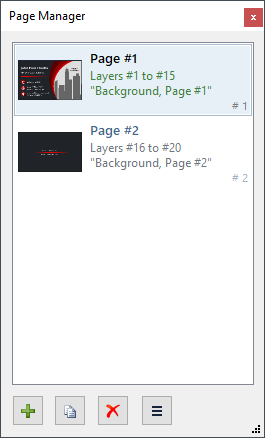 |
The Page Manager shows a list of pages as well as basic information about them, such as the layers that form that page and the title assigned to it. A preview of the page is also shown; this is updated regularly as you edit the image. Several actions are also provided, such as adding a new page, deleting pages, and exporting an entire page to a new file or copying it to the system clipboard. |